Mastering Instagram Stories: Essential Tips, Tricks, and Creative Hacks
When Instagram first launched its Stories feature, reminiscent of Snapchat’s popular format, many of us initially felt a wave of skepticism. The thought of needing to produce even more content to keep up across various social platforms was, to say the least, overwhelming. For those deeply immersed in the world of social media for professional purposes, the idea of adding another platform to the daily grind, especially one as demanding as Snapchat, seemed daunting and frankly, unsustainable for personal use. It often felt like an extra layer of complexity we simply didn’t need.
However, the narrative quickly shifted. Once we experimented with Instagram Stories and realized the immense potential to connect with a wider audience directly within a platform we already cherished, the decision became clear. Snapchat, for many, gradually faded into the background. It became evident that Instagram Stories offered a more integrated and efficient way to share ephemeral content, reaching existing followers without the need to manage yet another distinct social presence. This consolidation streamlined our content strategy, making it easier to maintain a consistent and engaging online presence.
For those of you who were avid Snapchat users, we’re curious: do you still use it regularly, or primarily for private messages with close friends? We know a significant portion of our community truly valued the unique content shared on Snapchat, so we’re eager to hear your thoughts on our current exclusive focus on Instagram Stories. Do you actively use both platforms, or do you find yourself favoring one over the other for your daily content consumption and creation? Your insights are invaluable, so please share your perspective in the comments!
Why Instagram Stories Are Indispensable for Content Creators and Brands
In today’s fast-paced digital landscape, Instagram Stories have evolved from a mere feature into an indispensable tool for anyone looking to build a strong online presence. They offer a unique, authentic, and immediate way to connect with your audience, fostering a sense of intimacy and engagement that traditional feed posts often can’t replicate. Stories provide a canvas for raw, unfiltered moments, behind-the-scenes glimpses, and interactive content that keeps your followers hooked and coming back for more.
For businesses, Instagram Stories are a powerful marketing channel, allowing for dynamic product showcases, exclusive promotions, and direct calls to action. They enable brands to tell compelling visual stories that resonate on a personal level, humanizing their presence and building deeper relationships with consumers. For individuals, Stories are a fantastic way to express creativity, share daily life updates, and cultivate a distinct personal brand. Mastering the art of Instagram Stories is no longer optional; it’s a critical component of a successful social media strategy. Our team has become truly passionate about uncovering the best tips, tricks, and hacks to help you elevate your Instagram Story game.
We’ve meticulously compiled a list of not-so-well-known techniques and broken them down into simple, actionable design inspirations that will help you jazz up your Stories on the fly. And yes, we even put together a video tutorial to demonstrate these hacks in action, ensuring you can easily follow along and implement them effectively!
Unlock Your Creativity: Top Instagram Story Tips & Tricks
1. Craft Dynamic Looping Videos with Boomerang
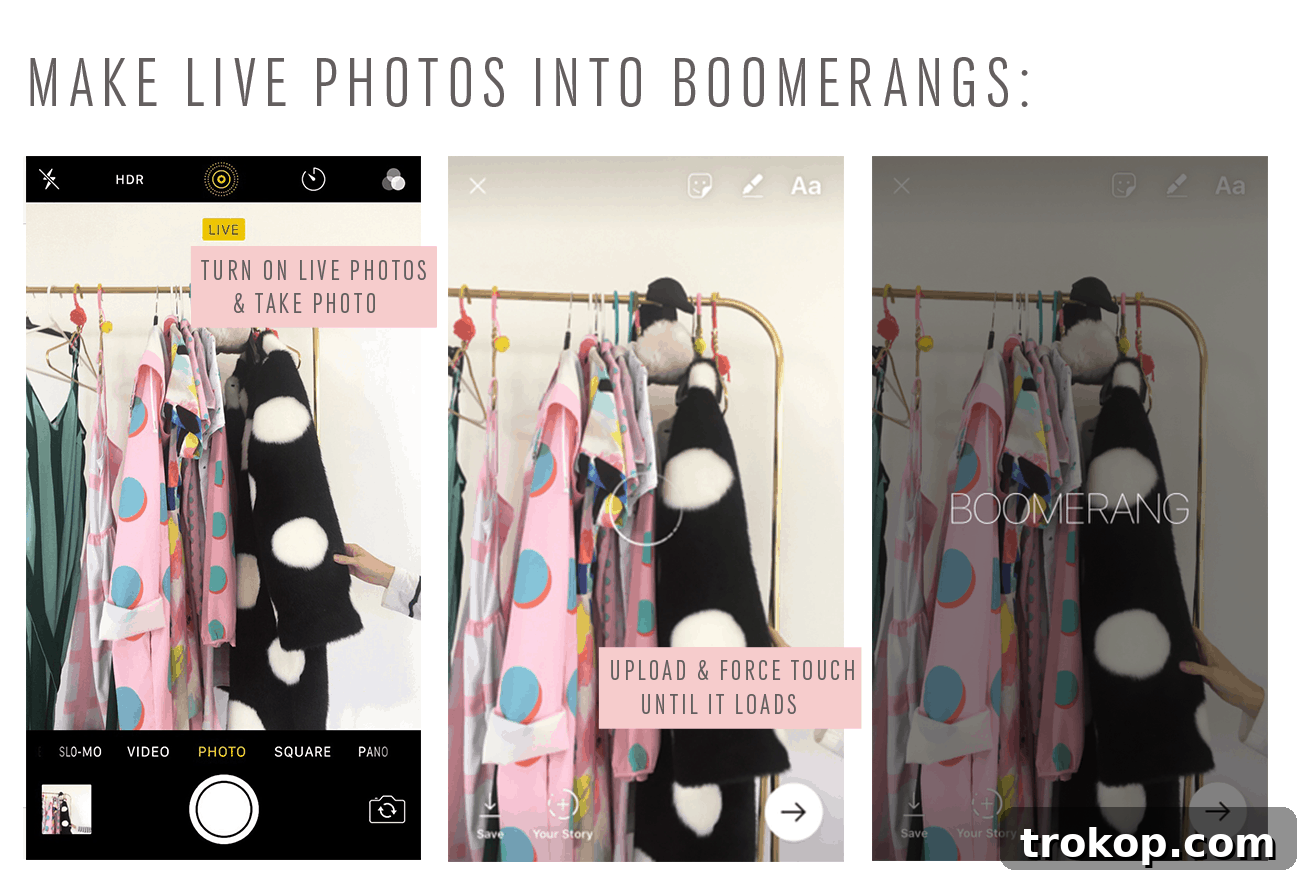
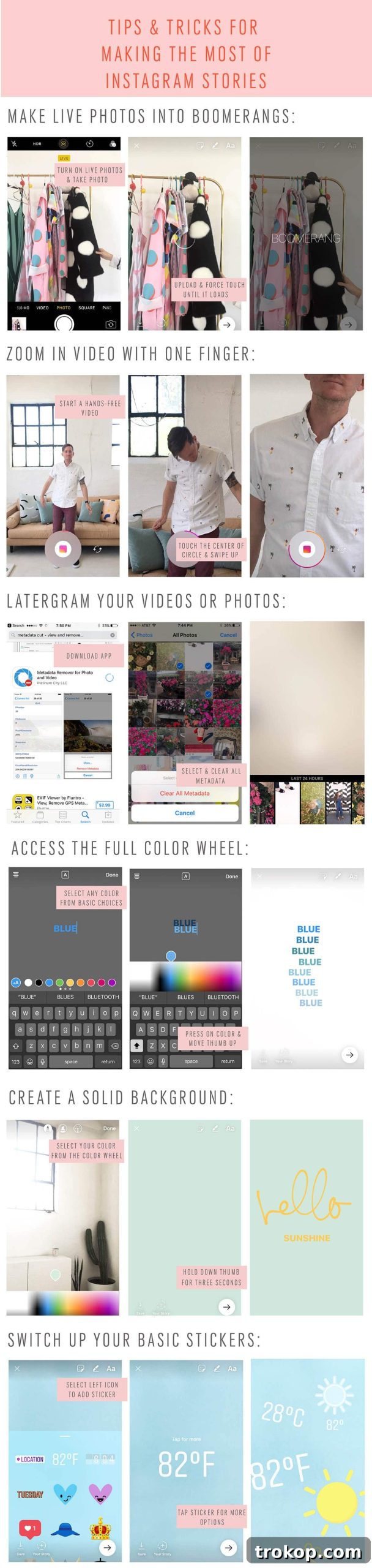
Move beyond static images and traditional videos by utilizing Instagram Stories’ built-in Boomerang feature. This allows you to capture a burst of photos that are then stitched together into a short, looping video that plays forwards and backward. It’s a fantastic way to animate everyday moments, showcase quick actions, or add an unexpected, playful touch to your content. To use it, simply select the Boomerang option when you open your Stories camera. You can also find Boomerang functionality within Facebook Stories – just look for the “Live” button or equivalent options in their camera interface to create similar engaging loops. This feature is perfect for capturing movement, expressions, or products in a captivating, repetitive sequence that instantly grabs attention.
2. Achieve Professional Zoom Effects with a Single Finger

Elevate your video quality in Instagram Stories with a simple yet effective trick. When recording a video using your phone’s back camera, gently place and hold just one finger over a small part of the screen. As you do this, you’ll notice the camera smoothly zooms in, adding a touch of professionalism and dynamic flair to your footage. This method creates a subtle, cinematic zoom effect without the need for intricate editing software or complicated filters. It’s an excellent way to direct your viewer’s attention to a specific detail, build suspense, or simply make your videos feel more polished and engaging, all in real-time within the app.
3. Strategically Plan and Upload with the “Latergram” Approach
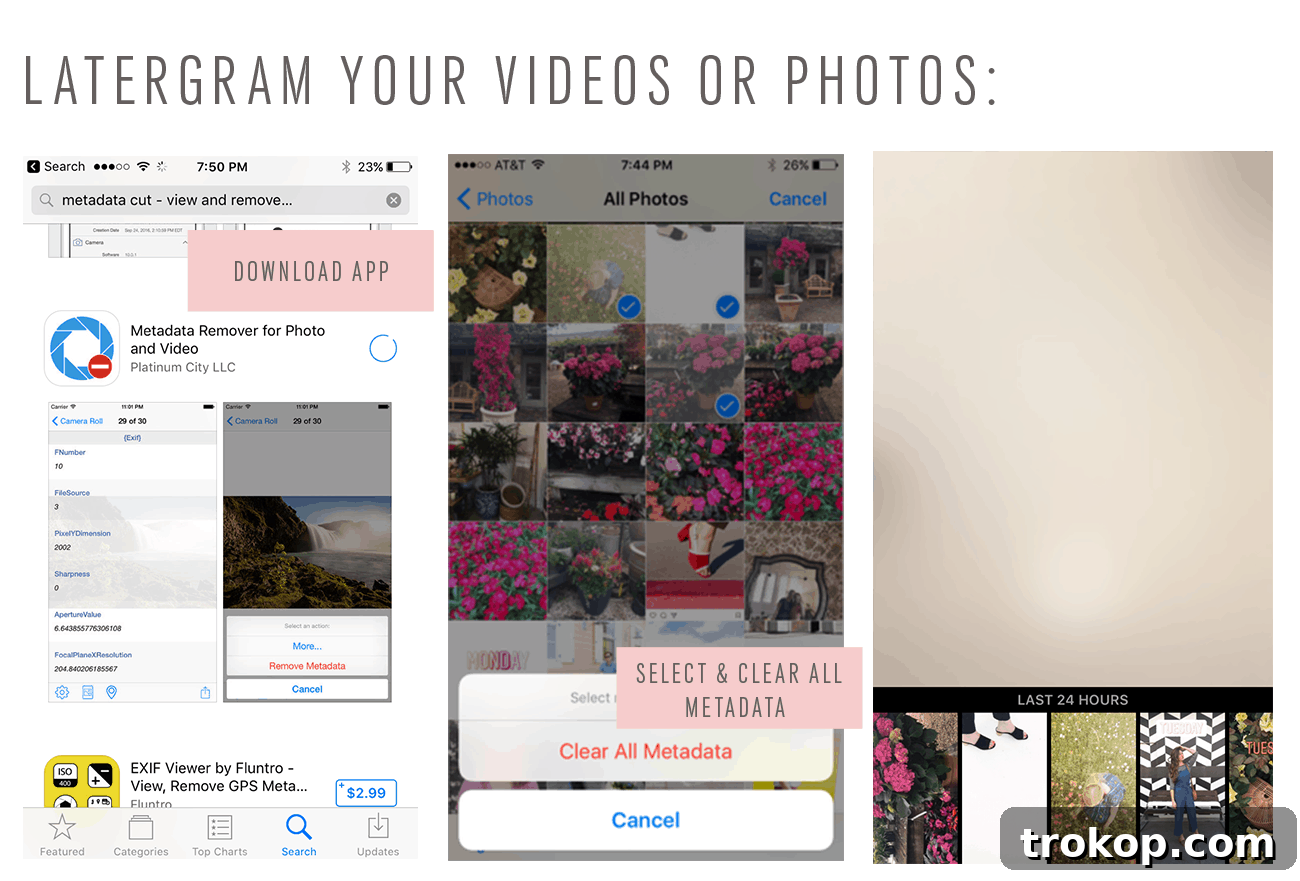
While Instagram Stories are known for their spontaneity, strategic planning can significantly enhance their impact. Instead of immediately uploading every photo or video you capture, consider saving your best shots for later. The Instagram Stories interface often allows you to save drafts or simply save your content directly to your phone’s camera roll. This gives you the flexibility to choose the optimal time for your posts to go live, ensuring they reach your audience when they are most active. This “latergram” approach for Stories means you can curate your content, refine your message, and maintain a consistent posting schedule, leading to better engagement and a more polished brand presence.
4. Unleash the Full Spectrum: Access the Hidden Color Wheel
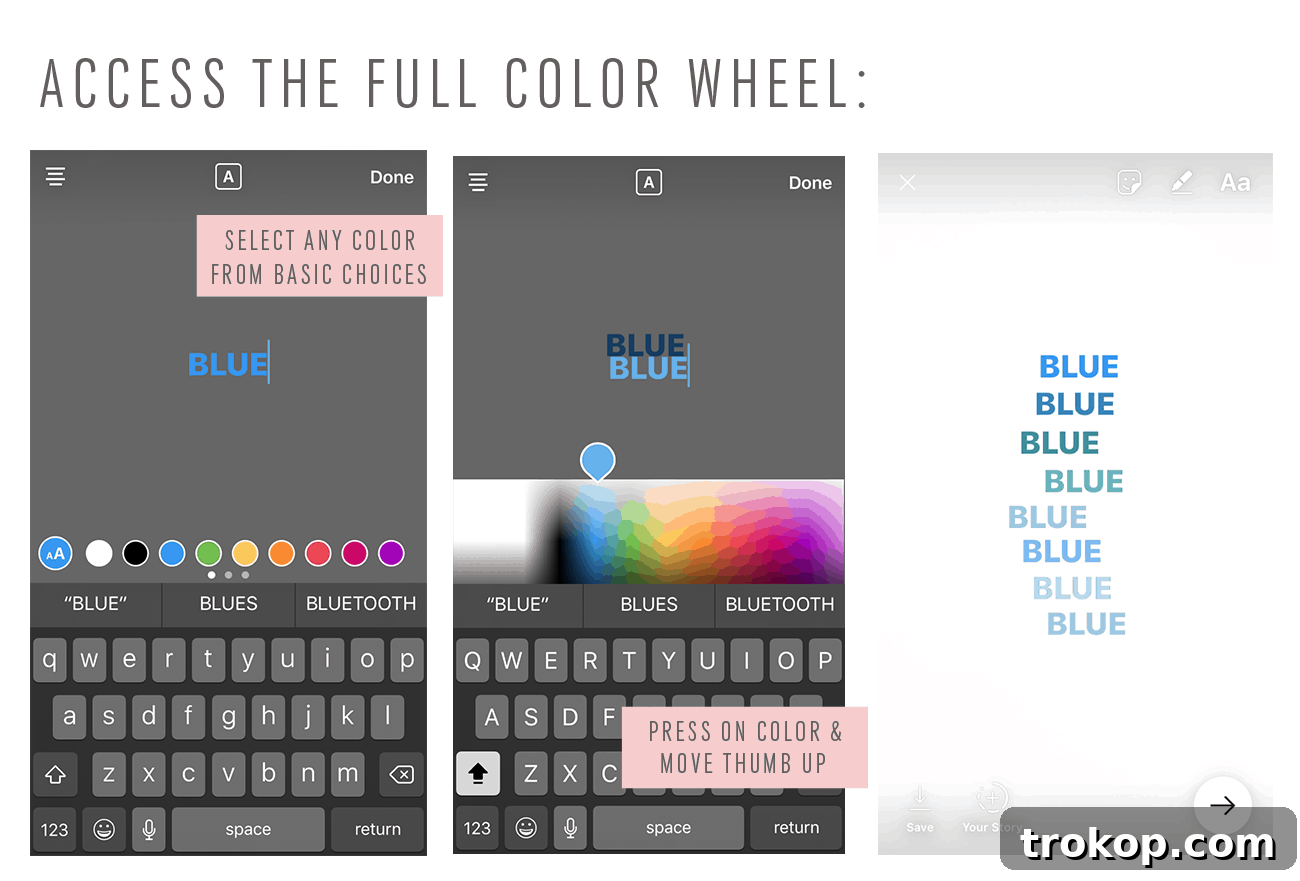
Don’t limit your creative expression to the default color swatches provided in Instagram Stories. When adding text or a background color to your posts, you’ll see a limited palette. To access a vastly expanded selection of hues, simply tap and hold on any of the default color circles. This action will reveal a complete color wheel or a gradient slider, allowing you to fine-tune your color choice to perfectly match your brand aesthetic or mood. This hidden feature is a game-changer for designers and anyone looking to create visually cohesive and stunning Stories, offering endless possibilities for vibrant backgrounds, personalized text, and unique graphic elements that stand out.
5. Create Striking Solid Color Backgrounds
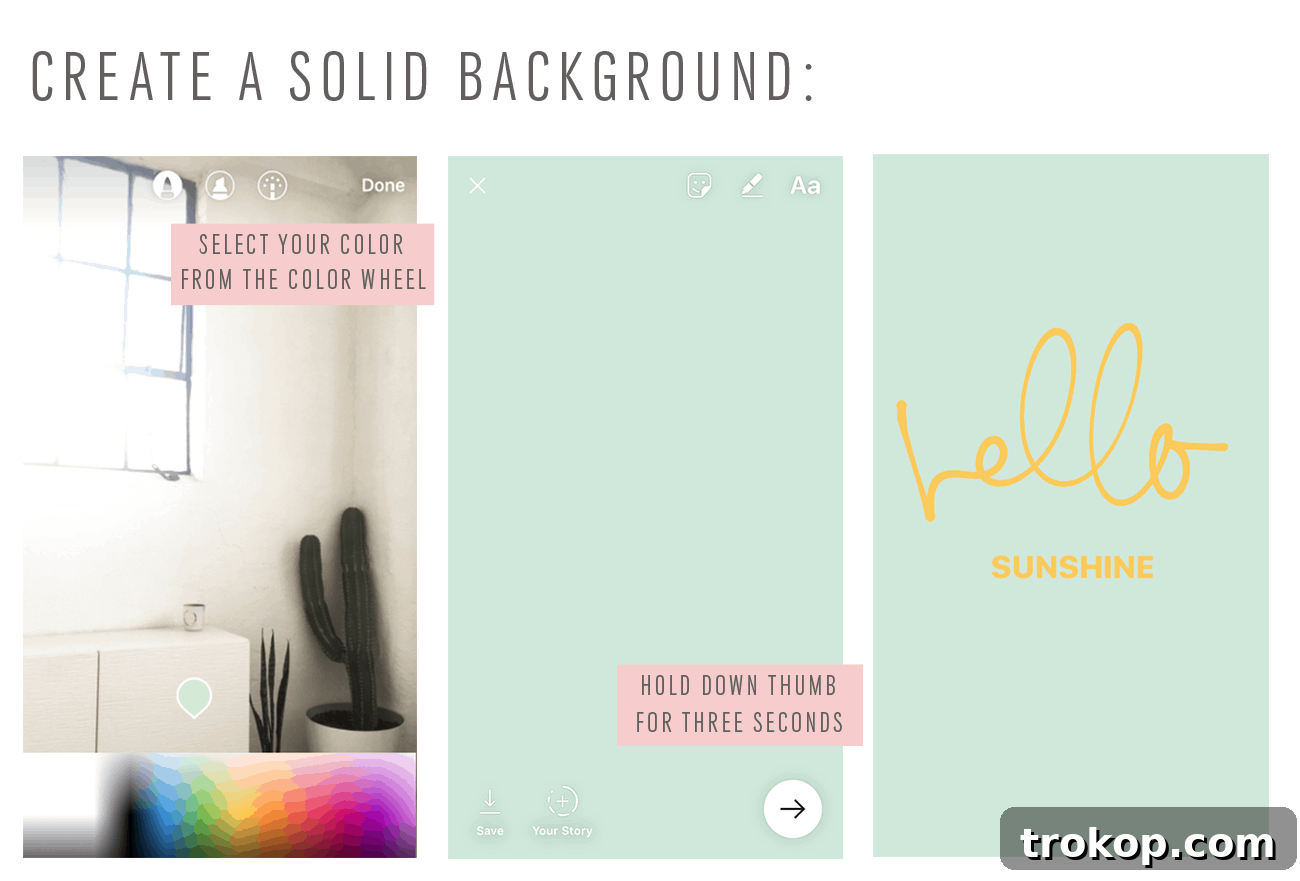
Sometimes, simplicity is key. To create a clean, solid color background for your Instagram Stories – perfect for impactful text overlays or graphic designs – start by taking any photo or video. Once you’re in the editing screen, select the drawing tool (the pen icon). Choose your desired color from the palette (or access the full color wheel as described above). Then, simply tap and hold your finger anywhere on the screen for a few seconds. The entire screen will fill with the selected color, creating a striking and minimalist backdrop. This technique is incredibly useful for making text pop, announcing news, or giving your Stories a sophisticated, branded look.
6. Personalize Your Stories: Customize Sticker Colors
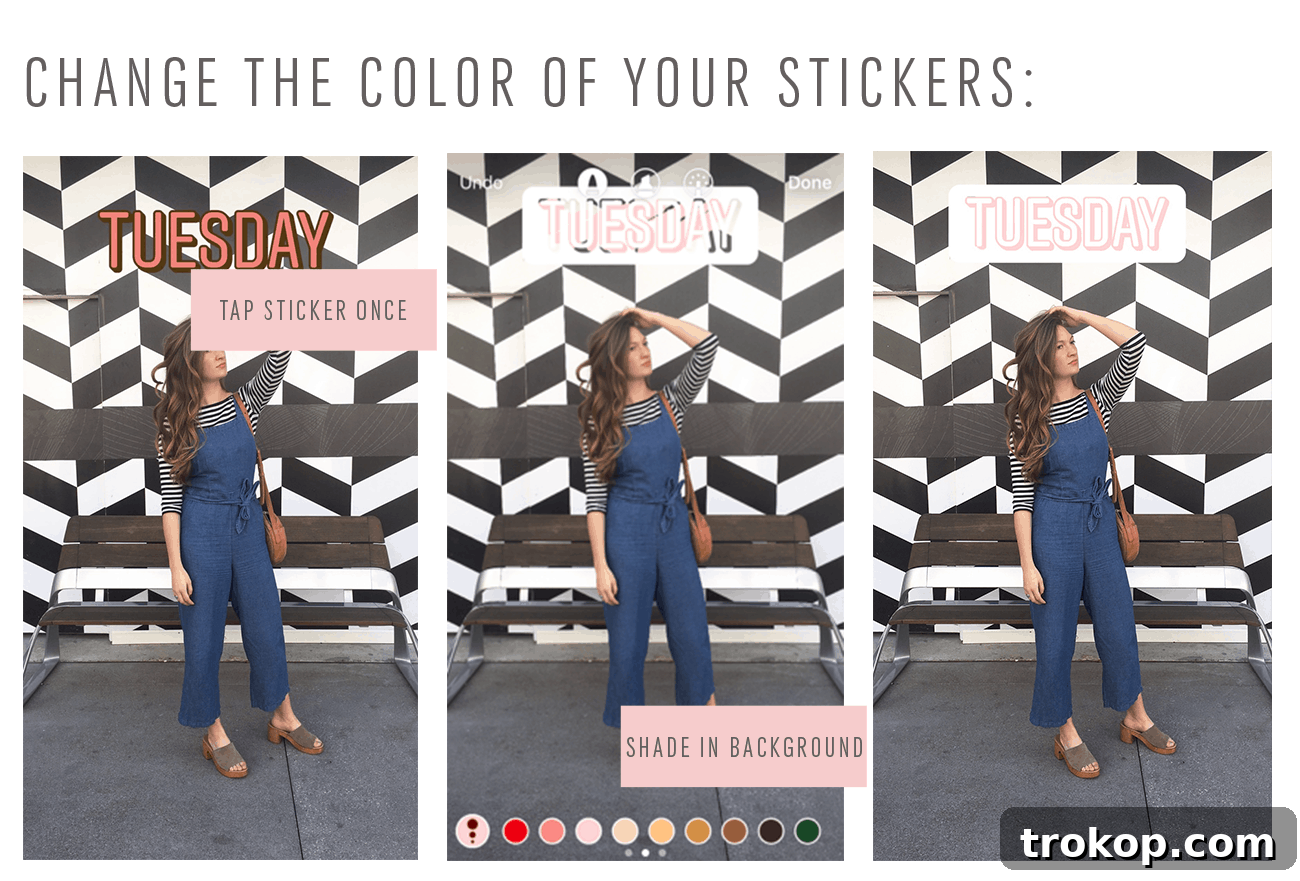
Instagram Stories stickers, from polls to question boxes and location tags, are fantastic for boosting engagement. But did you know you can often customize their colors to better match your Story’s aesthetic or brand palette? After adding a sticker to your Story, simply tap on it. For many stickers, a few taps will cycle through different color options. This subtle customization can make a significant difference in the overall visual harmony of your Story, ensuring that even interactive elements contribute to a cohesive and polished look. Experiment with different stickers and taps to discover which ones offer color variations.
7. Fine-Tune Your Text: Explore Colors, Sizes, and Font Styles
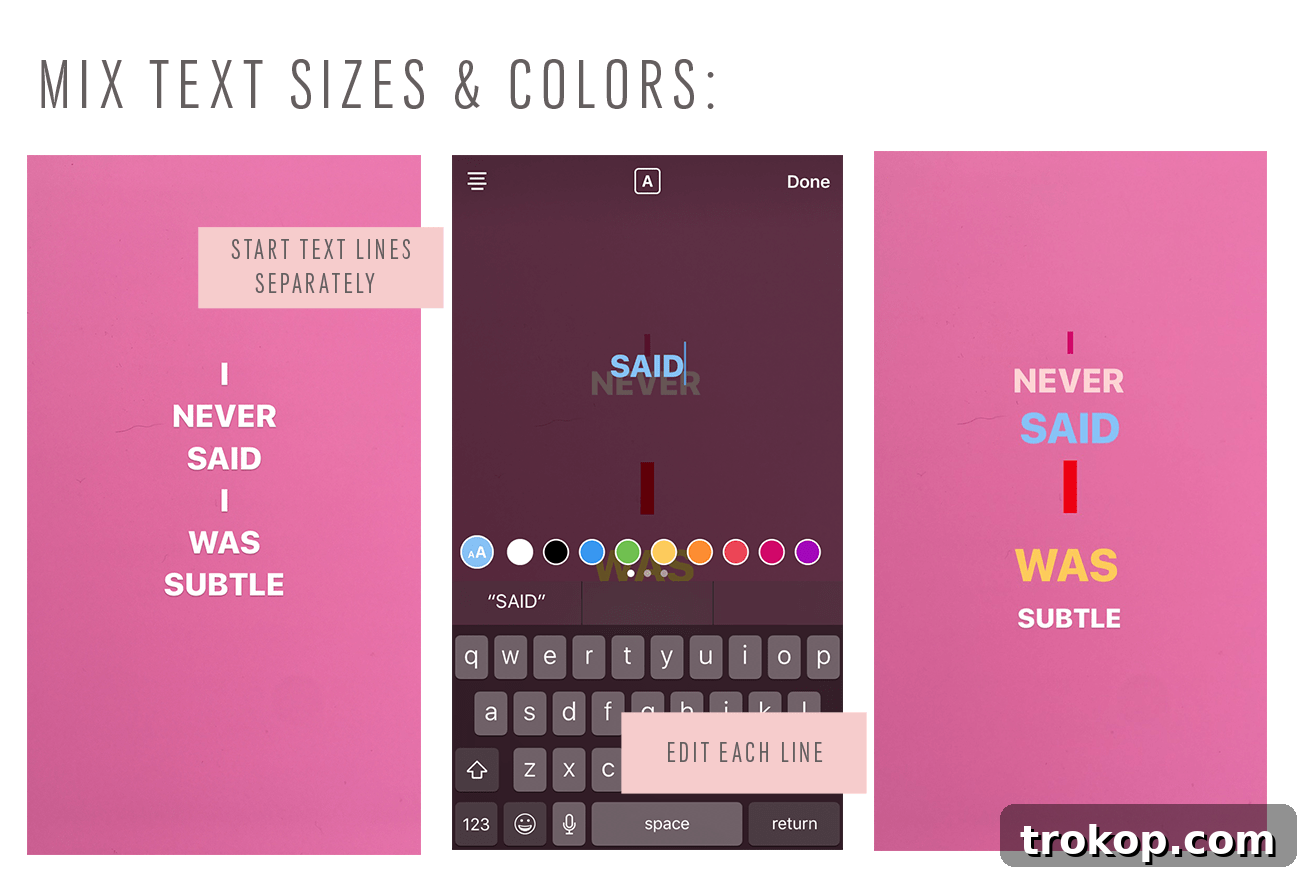
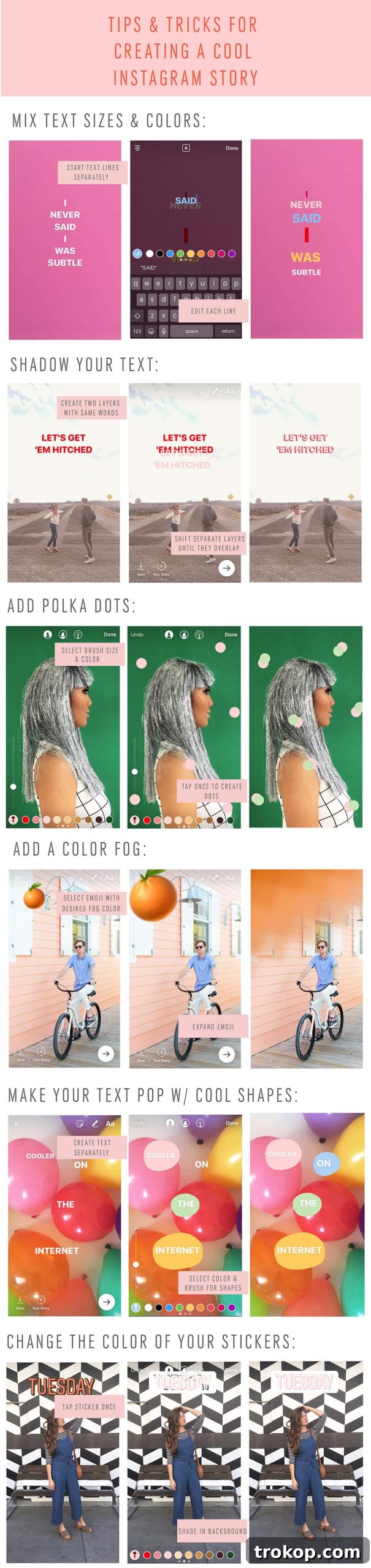
Text plays a crucial role in conveying your message in Instagram Stories, and customization is key to making it impactful. Beyond the basic white, you can select from a spectrum of colors for each text box, using the color palette or the hidden color wheel. Instagram also offers various font styles to choose from – simply tap the font name at the top of the screen to cycle through options. To adjust the size, pinch in or out on the text box, or use the slider on the left side of the screen. For multiple text boxes, apply different styles and colors to create visual hierarchy and emphasis. These options allow you to craft engaging narratives that align perfectly with your brand’s voice and visual identity.
8. Add Depth and Dimension with Text Shadows
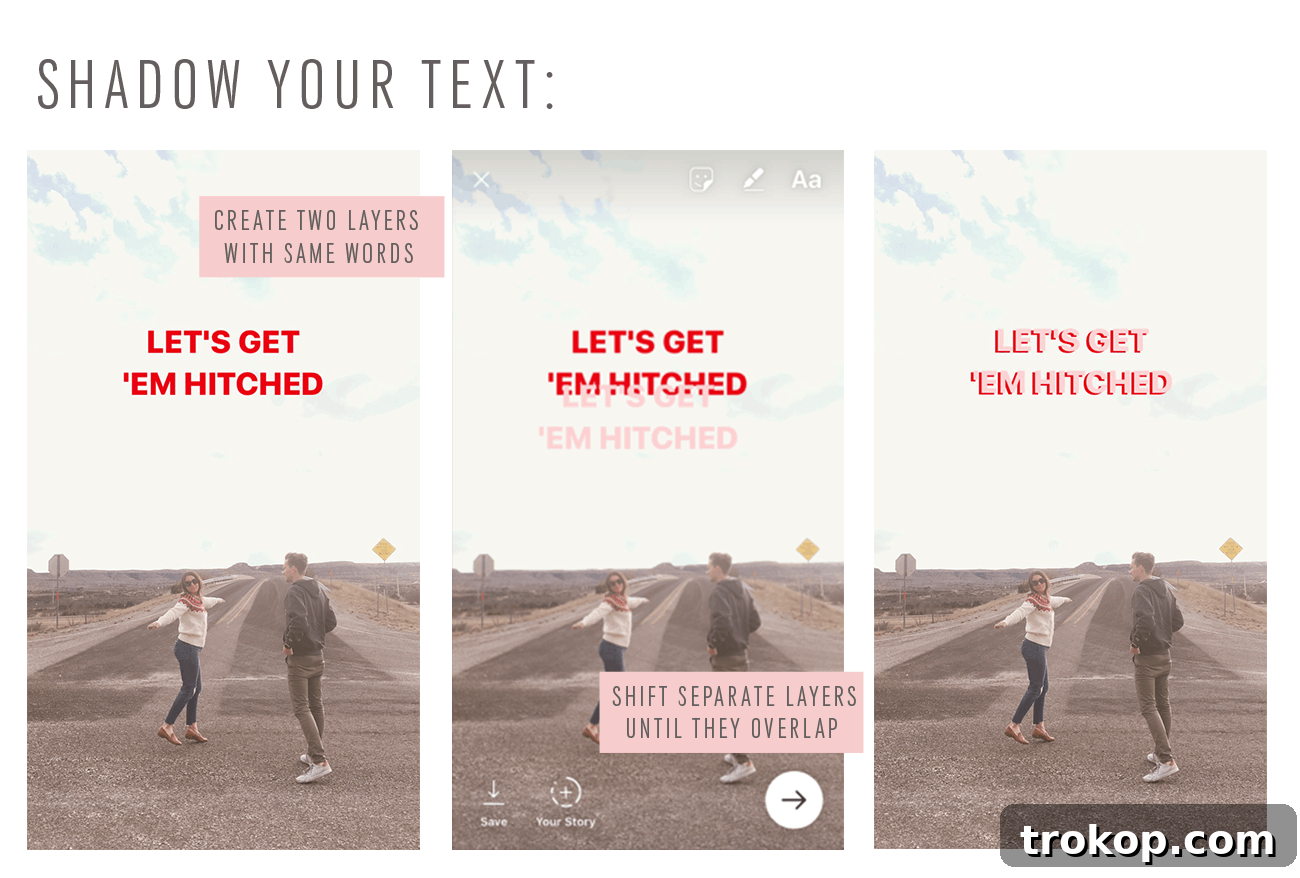
Make your text truly stand out and add a touch of professional polish by utilizing the shadow feature in Instagram Stories. After typing your text, you can often find an option, usually a small icon resembling a letter with a shadow, that allows you to add a subtle outline or shadow effect. This trick is invaluable for increasing readability, especially when your text is placed over a busy or brightly colored background. A well-placed shadow gives your text depth and makes it appear to pop off the screen, creating a more dynamic and visually appealing Story that effectively captures your audience’s attention.
9. Apply Creative Color Overlays and Filters
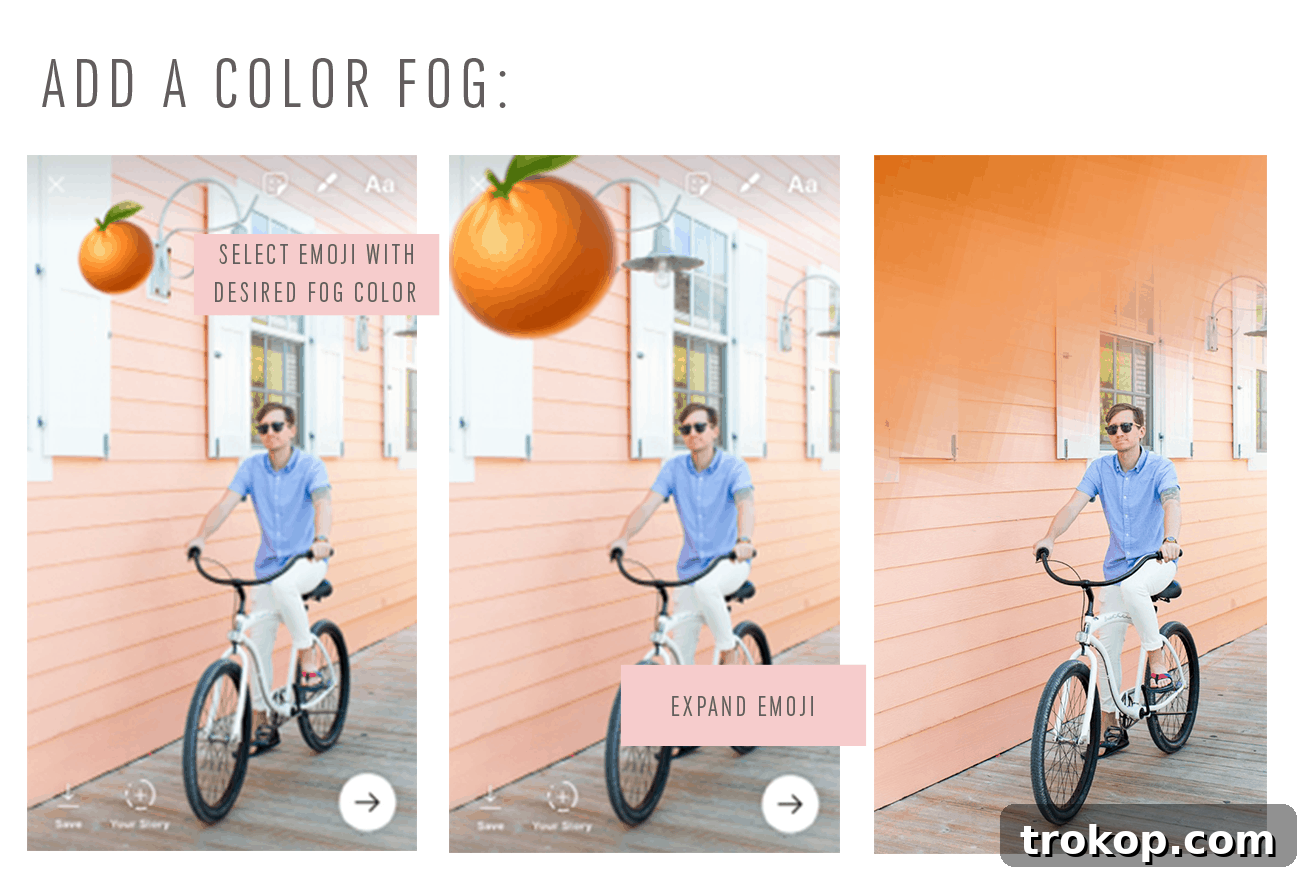
Beyond the standard filters, Instagram Stories allows for highly creative color overlays and ‘fog’ effects that can dramatically alter the mood and aesthetic of your visuals. To achieve this, take your photo or video, then select the drawing tool. Pick a color, and instead of filling the entire screen, select the highlighter pen tool. Gently tap and hold your finger on the screen. This will apply a semi-transparent color overlay, or ‘fog,’ over your entire image. Experiment with different colors and opacities to create unique atmospheres – from a warm golden glow to a cool blue mist. This technique is perfect for branding, creating a consistent visual theme, or simply adding an artistic touch to your Stories.
10. Enhance Aesthetics with Customizable Polka Dots
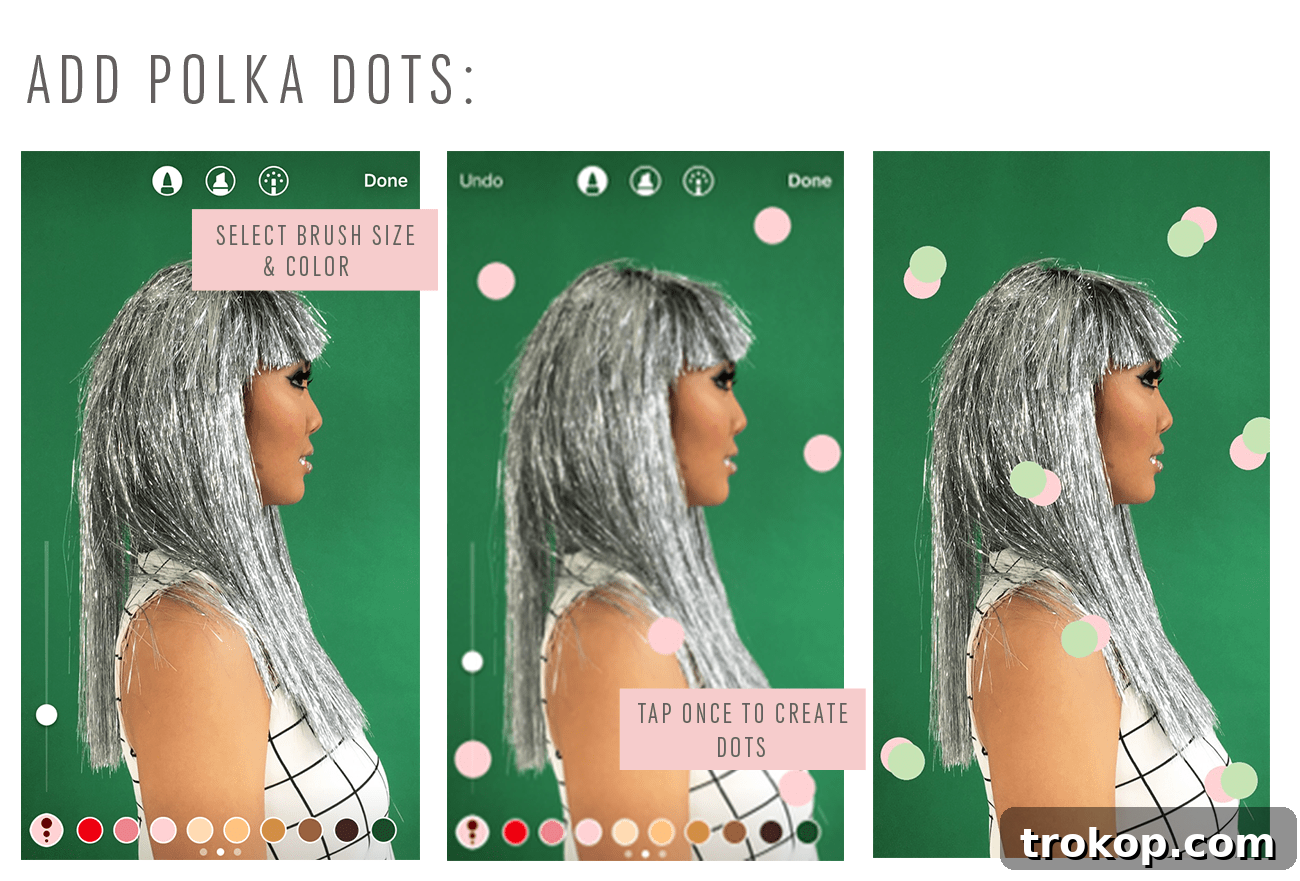
For a fun and visually appealing design element, consider adding customizable polka dots to your Instagram Stories. While not a standalone feature, you can creatively use certain stickers or the pen tool to achieve this effect. Some text backgrounds, or even specific graphic stickers, can be manipulated or layered to create a polka dot pattern. Alternatively, use the pen tool with a small brush size and tap repeatedly to manually create dots of varying colors. This playful design choice can add personality and charm, making your Stories more engaging and aesthetically unique. It’s a fantastic way to break up busy backgrounds or simply inject a touch of whimsy into your content.
11. Make Text Pop with Creative Shapes and Backgrounds
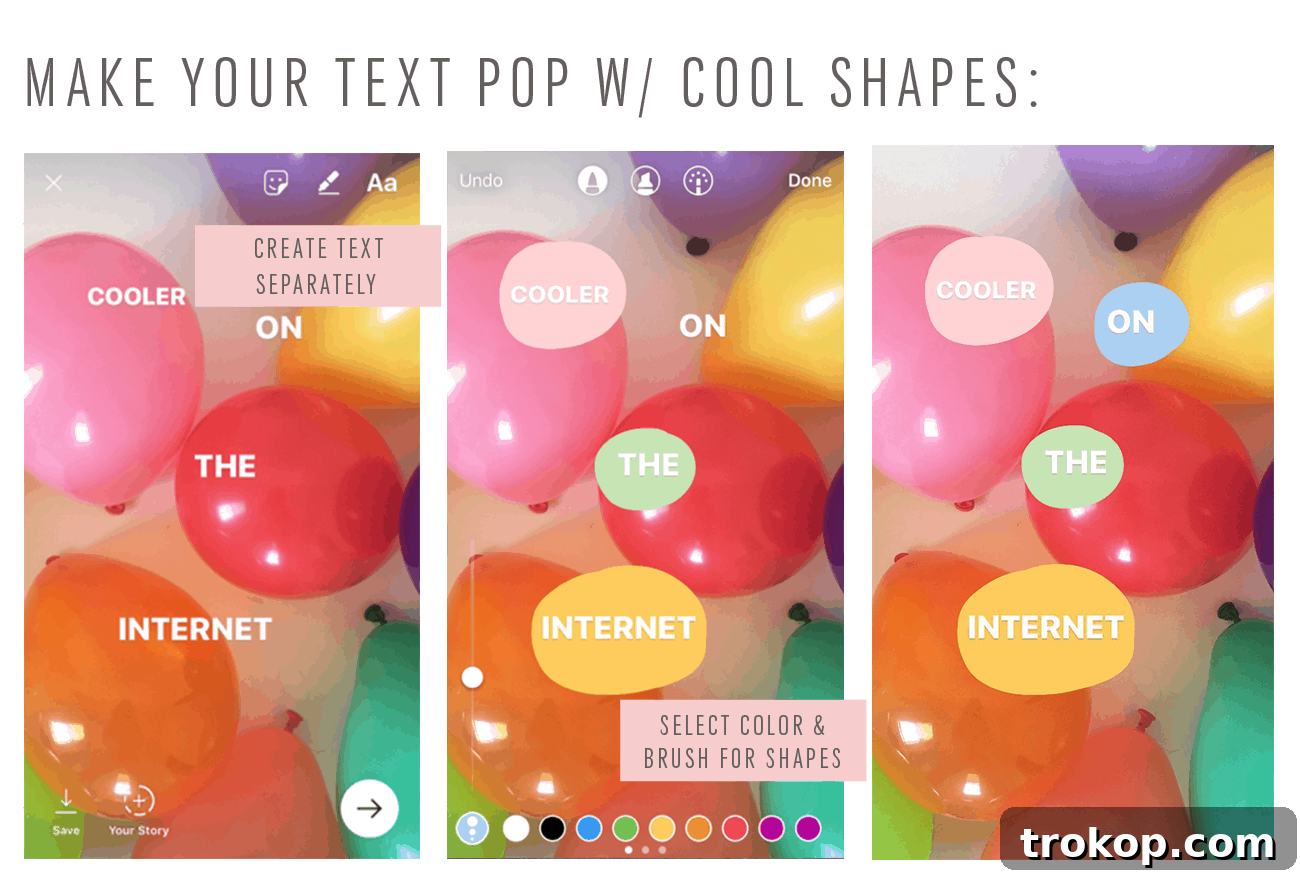
To truly make your text stand out in Instagram Stories, move beyond plain text and experiment with various background shapes. After typing your text, look for the ‘A’ with a star/sparkle icon or similar background options in the text editing menu. Tapping this will cycle through different background styles, such as solid blocks, translucent banners, or outlined shapes. These text backgrounds not only improve readability but also add a significant design element, making your messages more impactful and visually appealing. Using different shapes and colors can help organize information, highlight key points, and contribute to a polished, professional look that captures and holds viewer attention.
It’s been incredibly rewarding to explore and experiment with new ways to creatively present our content, constantly pushing the boundaries of what’s possible within Instagram Stories. We’re consistently inspired by the innovative approaches of other talented creators in the community. Some of our absolute favorites to follow for daily inspiration include @alilabelle, @mattcrump, @peytonperry, @shopbando, @imakestagram, @topher, @designlovefest, @aimeemazzenga, @brightbazaar, @jeffreydgerson, and @glossier. Their feeds are a treasure trove of creative ideas and stunning visuals that consistently spark new concepts for our own Stories.
Your Turn: Share Your Instagram Story Wisdom!
So, what are your thoughts on these Instagram Story tips and tricks? Did you discover any new hacks that you’re excited to try out? Or perhaps, in our comprehensive list, did we miss any major tricks or innovative strategies that you swear by? We are always eager to learn from our community, so please don’t hesitate to share your own invaluable tips, creative ideas, and even your favorite Instagram accounts that inspire your Story content. Your contributions help make this space a richer resource for everyone striving to master the art of Instagram Stories!